Simul8 Assistant
The Simul8 Assistant uses Expert System technology to help you get your simulation right. It monitors your simulation building and the way you are using your simulation to provide advice where appropriate.
Using the Simul8 Assistant
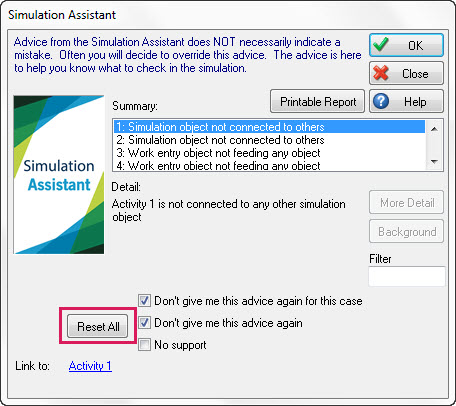
How do you know the assistant has some advice? The Simul8 Assistant icon on the top-left of the Simul8 tool bar will light up and rotate, and a pop-up dialog will be displayed when clicking on the icon.

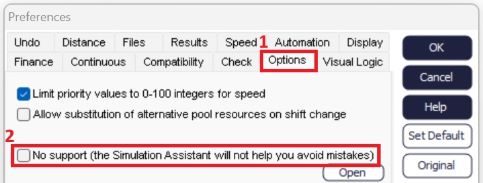
If you do not want the assistant to watch your simulation, you can switch it off by navigating to:
- File > Preferences > Options
- Check the box for No Support
Once you have read some advice, you might decide it is not relevant to the way you use the simulation. In this case you can ask the assistant not to give you that advice again. You can switch off a particular category of advice completely, or you can switch it off just for the particular combination of simulation objects.
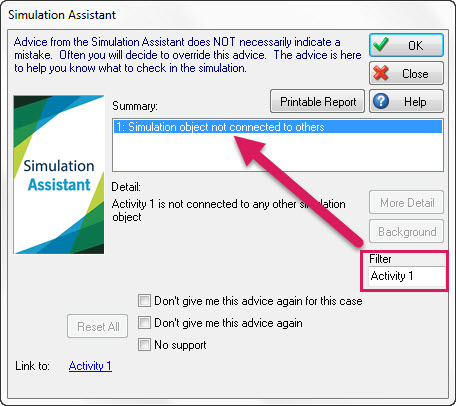
Filtering the Simulation Assistant Summary
Advice given by the Simul8 Assistant can be filtered. This means that you can search for terms and even object names, to get a better idea of what may be happening in your simulation.
The Reset All button in the assistant dialog can be used to switch back on all categories of advice.