External Distributions
External distributions allow Simul8 to collect timing information from other Windows packages, rather than simply using Simul8’s built-in statistical distributions. There are two types of external distributions that you can use: Excel and Visual Basic.
Excel External Distribution
Sometimes it is useful to use real data in your simulations rather than use statistical distributions that emulate real data.
One way to do this is to place the data in a spreadsheet and have Simul8 draw the data across into the simulation as it needs it.
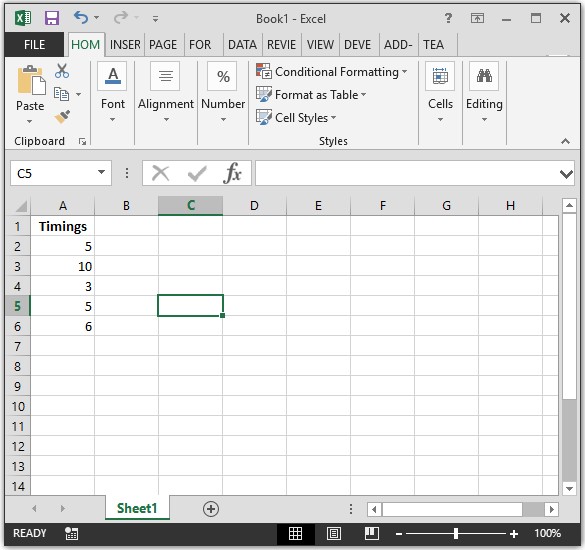
For example, say that you have arrivals that come at specified times as shown in the Excel spreadsheet below.
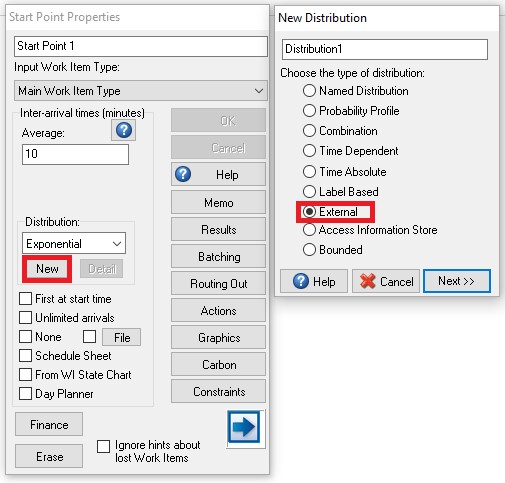
We can attach these timings to a Start Point by creating a new External Distribution. You can set this up by clicking New on the Start Point Distribution and clicking External.
Click Next and then choose Excel and fill in the name of your spreadsheet and the location (e.g. R2C1 for Row 2, Column 1) where your data starts. The data can be in a column, a row or a single cell. (Note: Make sure to use the full name of your spreadsheet, including the .xls or .xlsx extension)
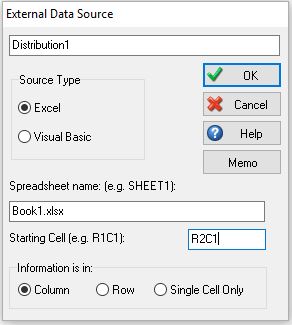
If your data is located in a column or a row, Simul8 looks for where the data ends by detecting a cell that does not contain a number. If the Start Point requires more arrivals than the data you have, Simul8 will repeat the data.
For example, using the above timings, a Work Item will arrive at minute 5 of your simulation, minute 15, minute 18, minute 23, minute 29, minute 34, and so on, continually repeating the sequence.
This type of distribution is useful when you have timings which follow a sequential and repeatable pattern.
Visual Basic External Distribution
This is provided for backwards compatibility only. Simul8 COM is the new method you should use.